
Your Guide to Building an Agile Project Plan
If you're new to agile, the first thing to get your head around is that an agile project plan isn't a single, hefty document you create once and then file away. Forget the massive Gantt charts that are outdated the moment they’re printed. An agile plan is a living, breathing set of artifacts that guides the team but also changes right along with the project.
Its whole purpose is to embrace change, not resist it. Instead of locking everything down from the start, it’s built for flexibility, relying on constant feedback to deliver real value piece by piece.
What an Agile Project Plan Actually Is

Think of a traditional project plan as an old-school paper map. It gives you a detailed, fixed route from point A to point B. But what happens when you hit an unexpected road closure? The map is suddenly useless, and you're stuck.
An agile plan, on the other hand, is like a GPS app on your phone. It knows the destination, but it’s constantly recalculating the best path based on live traffic, accidents, and your progress. If a roadblock appears, it seamlessly finds a better way. That’s the real magic of agile planning—it’s built for detours.
From Predicting the Future to Adapting to Reality
At its core, agile planning represents a huge shift in mindset. You stop trying to predict every single detail months or years in advance and instead accept that you can't know everything upfront. The goal is to respond to new information and changing priorities, not to stick blindly to the original plan.
This is why an agile plan is made up of evolving tools like a product roadmap, a prioritized backlog, and release plans. They provide direction but are designed to be updated as the team learns more. You can see how these moving parts work together in a well-structured project plan outline.
This adaptive approach isn't just a niche trend; it's become the standard. Agile adoption in software development alone shot up from 37% in 2020 and is on track to hit 86% by 2025. Teams are clearly voting with their feet, choosing a framework that helps them navigate complexity and deliver what customers actually want.
An agile plan doesn't try to answer every question at the beginning. Instead, it provides just enough structure to start moving, learn from feedback, and make smarter decisions along the way.
Agile Planning vs Traditional Waterfall Planning
The best way to see the difference is to put the two philosophies side by side. Traditional waterfall planning has its place in highly predictable projects, but agile is designed for the uncertainty that defines most modern work.
| Attribute | Agile Project Plan | Traditional (Waterfall) Plan |
|---|---|---|
| Flexibility | Highly adaptive; changes are welcomed and expected. | Rigid and sequential; changes are difficult and costly. |
| Customer Involvement | Continuous collaboration and feedback throughout. | Limited to initial requirements and final review. |
| Delivery | Delivers value in small, frequent increments (sprints). | Delivers the entire project at the end of the timeline. |
| Planning | Iterative; planning is an ongoing activity. | Upfront; a detailed plan is created before work begins. |
As you can see, it's not just a different process—it's a fundamentally different way of thinking about how to build things and solve problems.
The Core Components of Your Agile Plan
An agile project plan isn’t some massive, single document you create once and then file away. Instead, it’s a living collection of interconnected parts that guide a project from a big idea all the way down to what someone is coding today.
Think of it like planning a cross-country road trip. You need a final destination (the vision), a general route with major cities you’ll hit (the roadmap), and the detailed, turn-by-turn directions for the next leg of the journey (the backlog). Each piece serves a specific purpose, flowing from broad strategy down to the nitty-gritty tasks. Getting how they all fit together is the secret to building a plan that’s both reliable and flexible.
The Product Vision: The "Why"
The Product Vision is your project's North Star. It’s a short, inspiring statement that answers the most important question: Why are we even building this? This isn't the place for a laundry list of features; it's the big-picture goal that gets the team excited and keeps stakeholders aligned.
A powerful vision statement keeps everyone grounded. Whenever the team faces a tough decision—should we build this feature or that one?—they can always ask, "Does this get us closer to our vision?" It acts as the ultimate tie-breaker, making sure every ounce of effort serves that greater purpose.
For example, a vision for a new mobile banking app might be: "To empower young adults to manage their finances effortlessly and build wealth with confidence." Every single decision, from the app's color scheme to its core functions, would be measured against that statement.
The Product Roadmap: The "What" and "When"
If the vision is your destination, the Product Roadmap is the high-level map showing the highways you'll take to get there. It’s a strategic visual that lays out the major initiatives or themes you plan to tackle over time, usually broken down by quarter.
The roadmap clearly communicates what the team is focusing on and a rough timeline, connecting the day-to-day work back to the company's bigger goals. It's all about major themes, not tiny, granular tasks.
A simple roadmap might look something like this:
- Q1: Launch core transaction features and user onboarding.
- Q2: Introduce budgeting tools and savings goal trackers.
- Q3: Integrate with third-party financial services.
This is your go-to tool for managing stakeholder expectations and showing everyone where the project is headed. It’s a statement of intent, not a blood oath, and it’s meant to change as you learn more.
The Product Backlog: The "How"
The Product Backlog is where you get those turn-by-turn directions for the journey. It's a living, prioritized list of everything that might ever be needed for the final product—new features, bug fixes, technical improvements, you name it.
The Product Owner is responsible for the care and feeding of the backlog, which serves as the single source of truth for all the development team's work. Items at the very top are the highest priority and should be broken down into small, well-understood chunks ready for the team to tackle.
The Product Backlog is never "done." It is a living artifact that constantly changes based on new business needs, market shifts, and customer feedback.
User Stories and Epics
Backlog items are typically written as user stories, which are simple descriptions of a feature from the perspective of the person who will use it. Most teams use a straightforward template: "As a [type of user], I want [to do something] so that [I can achieve some benefit]."
Really big user stories are called epics. For instance, "User Account Management" might be an epic. That's way too big to work on at once, so you’d break it down into smaller, manageable stories like "user registration," "password reset," and "profile updates." This approach of breaking down big ideas into small pieces makes the work much easier to estimate and build. For a deeper look into this process, you can find some great guidance on story point estimation and how it helps teams figure out the effort involved.
Together, the Vision, Roadmap, and Backlog create a powerful framework. They give you a clear line of sight from the highest strategic goals down to the individual tasks the team is working on today, providing the structure and agility your project needs to thrive.
How to Build Your Agile Plan Step by Step
Alright, so you understand the moving parts of an agile plan. Now, let's roll up our sleeves and actually build one. This is where theory meets practice. Creating a solid agile project plan isn't about just grabbing a template and filling in the blanks; it's a thoughtful process of figuring out your destination and then plotting an adaptable course to get there.
Think of it as a series of deliberate steps that connect a big, ambitious idea to the day-to-day work your team will tackle. This process makes sure that every task, from a major feature release down to a tiny bug fix, traces back to your core strategic goals.
Let's walk through it, one step at a time.
Step 1: Craft the Product Vision
Before you write a single line of code or sketch out a wireframe, you need to nail down the "why." The product vision is the bedrock of your entire plan. It’s a short, inspiring statement that clearly explains what your product is for, who it helps, and the unique value it brings to the table.
This vision acts as your project's North Star. When your team is debating features or priorities get muddled, the vision statement is what pulls everyone back into alignment. A great one is clear, compelling, and gives direction without dictating the exact solution.
For instance, a vision for a new project management tool might be: "To help small teams eliminate administrative busywork so they can focus on the creative work that truly matters." That simple sentence will guide every single decision you make from here on out.
Step 2: Develop the High-Level Roadmap
With your destination locked in, the next move is to sketch out the product roadmap. This is your strategic, bird's-eye view of the major features or themes you plan to deliver over time, often broken down by quarter. The roadmap is what translates your inspiring vision into a tangible plan that stakeholders can actually get behind.
But here’s the key: a roadmap is not a Gantt chart with rigid, unmovable deadlines. It’s a statement of intent that focuses on outcomes, not just output. It communicates the "what" and a rough "when," but it’s designed to be flexible, allowing you to adapt as you learn from your customers and the market.
An agile plan flows from the high-level vision, through the strategic roadmap, and down to the detailed backlog. This diagram shows how these core components all fit together.
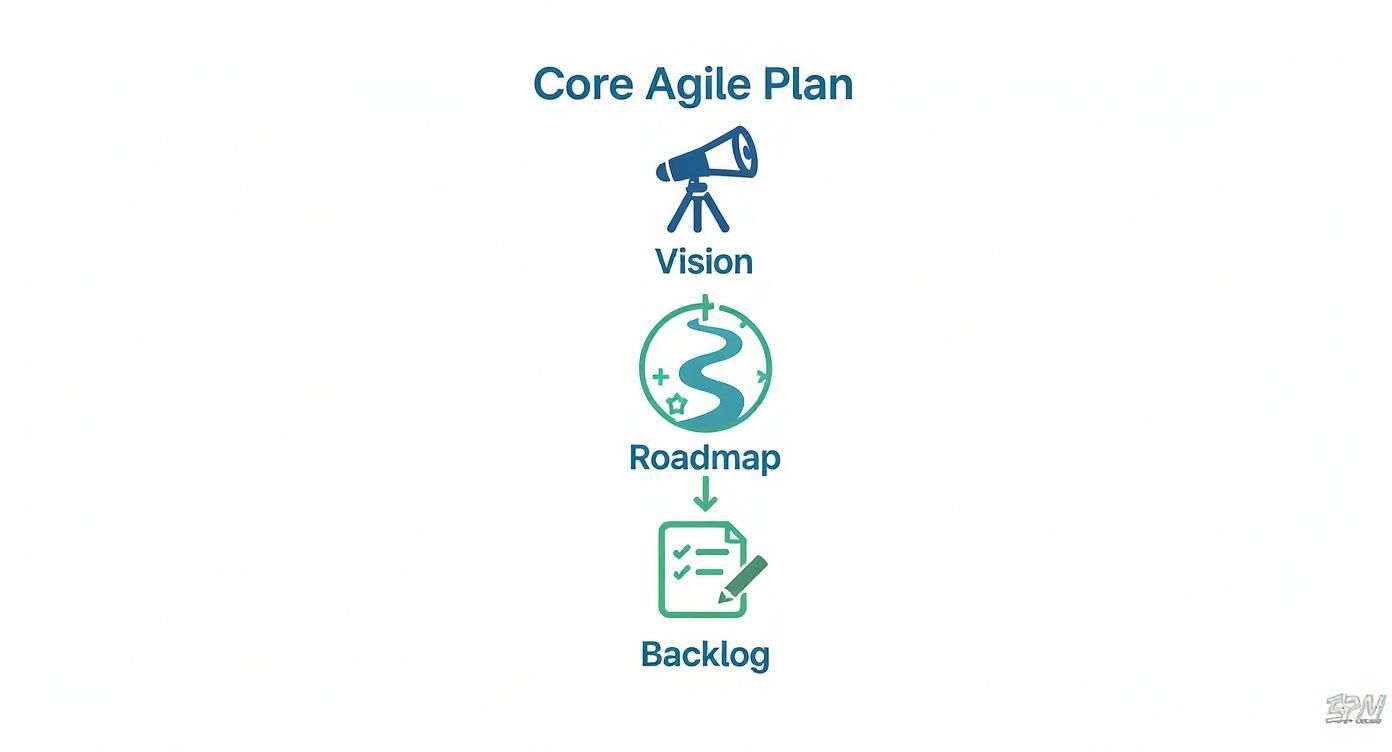
This hierarchy makes it clear that every small task in the backlog should ultimately serve that big-picture vision.
Step 3: Build and Prioritize the Product Backlog
Now we zoom in. The product backlog is the living, ordered list of everything that might possibly be needed for the product. It’s the single source of truth for the development team, containing everything from user stories and feature requests to bug fixes and technical improvements. The Product Owner is the guardian of this list, responsible for keeping it organized and prioritized.
Items at the top of the backlog are the most critical and need to be fleshed out and ready for the team to grab. As you move down the list, items can be bigger, less defined "epics."
A classic rookie mistake is treating the backlog like a static to-do list. A healthy backlog is constantly evolving through a process called backlog grooming (or refinement), where the team adds details, estimates effort, and re-orders items based on the latest insights.
To keep user stories in great shape, many teams use the INVEST acronym as a quality check:
- Independent: Can this story be worked on without being blocked by another one?
- Negotiable: It's a conversation starter, not a rigid contract.
- Valuable: Does it deliver real value to the user or customer?
- Estimable: Can the team give a rough estimate of the effort involved?
- Small: Is it small enough to be completed within a single sprint?
- Testable: Are there clear criteria to confirm when it’s truly "done"?
Step 4: Outline Release Plans
While the roadmap gives you a quarterly view, a release plan brings the focus in a bit closer. It groups a set of related backlog items into a specific release, providing a medium-term forecast for the next few months.
This is a huge help for managing stakeholder expectations, as it gives them a clearer picture of when they can expect to see significant new functionality. A release typically bundles the work of several sprints to hit a major milestone or business goal.
Step 5: Plan Your First Sprint
Finally, you’re ready to plan your first sprint (or iteration). During the sprint planning meeting, the team pulls a handful of the highest-priority items from the top of the product backlog—whatever they feel confident they can complete within the sprint's fixed timebox (usually 1 to 4 weeks).
They then break these user stories down into smaller, concrete tasks. This becomes their sprint backlog, a clear to-do list for the next couple of weeks. At the end of the meeting, the team commits to delivering a working, potentially shippable piece of the product by the sprint's end.
This is the moment the agile plan transforms from a document into a daily guide for the team. It kicks off the powerful cycle of building, getting feedback, learning, and adapting that sits at the very heart of agile.
Using Metrics to Guide Your Agile Plan
An agile project plan isn't a static document you create once and then file away. It's a living, breathing guide that relies on real-time data to stay relevant and accurate. Without data, your plan is just a collection of educated guesses.
Think of it like navigating a ship. You wouldn't rely on last month's weather forecast, would you? Of course not. You'd use live reports to adjust your course and steer clear of storms. Agile metrics are your project's live weather reports, giving you the crucial feedback needed to make smart decisions and keep things on track.
The Power of Relative Estimation
Before we can even talk about metrics, we need a way to measure the work. Traditional projects often get stuck trying to estimate tasks in exact hours or days, an approach that's famously unreliable. Agile flips this on its head with relative estimation.
The core idea is simple: size tasks in relation to each other rather than in absolute time. We do this using story points—an abstract unit that captures a combination of effort, complexity, and risk. A 1-point story is tiny, a 3-point story is a bit bigger, and an 8-point story is a hefty piece of work.
It's like sizing t-shirts. You don't need to know someone's exact chest measurement in inches. You just need to know if they generally wear a Small, Medium, or Large. It’s faster, less stressful, and just as effective for planning purposes.
Measuring Team Capacity with Velocity
Once your team starts completing work measured in story points, you can calculate their velocity. This is the single most important metric for forecasting in an agile plan.
Velocity is simply the average number of story points a team completes in one sprint. If your team finishes 20, 22, and 18 points over three sprints, their average velocity is 20. This number represents the team's sustainable pace. Armed with this knowledge, you can look at the total story points left in your product backlog and make a surprisingly reliable forecast of how many sprints it will take to get it all done.
Our guide on what velocity in scrum is offers a much deeper look into how to calculate and use this metric.
Visualizing Progress with Burn-Down Charts
A burn-down chart is a brilliantly simple graph that shows how much work is left versus how much time you have. The vertical axis tracks the total story points in a sprint, while the horizontal axis tracks the days.
Each day, you plot the remaining points. Ideally, you see a steady downward slope that hits zero on the final day of the sprint. This visual makes it immediately obvious if you're on track, ahead of schedule, or falling behind, giving the team a chance to course-correct before it's too late.
Spotting Bottlenecks with Other Key Metrics
While velocity and burn-down charts are the stars of the show, a few other metrics offer deeper insights into the health and flow of your project.
These data-driven tools aren't just for show; they help teams move from wishful thinking to predictable delivery. It's no surprise that organizations using agile approaches consistently report higher success rates. One study found that 39% of agile organizations reported top-tier project performance, contributing to an overall project success rate of 75.4%.
The table below breaks down the most important metrics you'll want to keep an eye on.
Key Agile Metrics for Project Planning
| Metric | Purpose | What It Measures |
|---|---|---|
| Velocity | Forecasting and capacity planning | The average amount of work (in story points) a team completes per sprint. |
| Burn-Down Chart | Tracking sprint progress | The amount of work remaining versus time left in a sprint or release. |
| Cumulative Flow Diagram (CFD) | Identifying bottlenecks | The number of work items in each stage of the workflow (e.g., To Do, In Progress, Done) over time. |
| Cycle Time | Improving process efficiency | The time it takes for a task to move from "In Progress" to "Done." |
| Lead Time | Measuring customer value delivery | The total time from when a request is made until it is delivered to the customer. |
By tracking these numbers, you get a clear, honest picture of your project's progress. This allows you to communicate with stakeholders confidently, adapt to changes gracefully, and ultimately build a plan that reflects reality, not just ambition.
Common Agile Planning Mistakes to Avoid
Even teams with the best intentions can stumble when moving to an agile project plan. It’s easy to slip back into old habits because adopting agile is so much more than learning new jargon—it's a complete shift in mindset. Knowing what the common tripwires are is the first step to building a planning process that can actually adapt to change.
One of the most common traps is treating the product roadmap like a rigid Gantt chart. I see it all the time: teams create a detailed, feature-by-feature timeline with hard deadlines stretching months into the future. This completely misses the point. A roadmap is supposed to be a strategic guide, focused on goals and themes, not a locked-in schedule you can’t deviate from.
Confusing the Backlog with a Static To-Do List
Another big one is seeing the product backlog as a fixed list of tasks. A healthy backlog is a living, breathing thing that you’re constantly refining and re-shuffling. If you look at your backlog and see the same items sitting untouched at the top for six months, that’s a red flag. It means you’re not responding to new information or changing priorities.
The backlog needs active management through regular grooming sessions. This keeps the most important work well-defined, estimated, and ready for the team to pull into the next sprint.
A stagnant backlog often leads to building features that are no longer relevant by the time they are released. The goal is to deliver current value, not to check off an old list.
Ignoring Retrospectives and Feedback
Perhaps the most damaging mistake of all is skipping the feedback loop. Agile ceremonies, especially the sprint retrospective, exist for one reason: to help the team get better over time. Teams that just go through the motions without making any real changes are throwing away the biggest benefit of the entire framework.
- How you know it's happening: Your retrospectives feel like a broken record, with the same complaints surfacing sprint after sprint.
- How to fix it: Every retrospective needs to end with at least one concrete action the team will try in the next sprint. Track that action item and see if it worked.
This failure to adapt is a key reason why hybrid models are gaining traction. The adoption of hybrid project management—which blends agile with more traditional methods—grew by a massive 57% between 2020 and 2023. This isn't a retreat from agile; it's a sign that teams recognize pure agile takes discipline. You can find more data on this in the latest agile development statistics.
Underestimating the Importance of the Product Owner
Finally, an absent or indecisive Product Owner can bring the whole process to a grinding halt. This person is single-handedly responsible for maximizing the product's value by owning and prioritizing the backlog. Without their clear direction, the development team is left trying to read minds about what to build next.
This inevitably leads to wasted work and a product that misses the mark with users. A great Product Owner is plugged in, makes tough calls, and acts as the crucial link between stakeholders and the development team. Steering clear of these common mistakes will help make sure your agile plan is a powerful tool for delivering great results.
Still Have Questions About Agile Plans?
As teams start to move away from rigid, traditional methods, a lot of practical questions come up. Let's face it, an agile plan is a completely different animal than what most of us grew up with, so it's only natural to have a few lingering uncertainties.
We've gathered some of the most common questions we hear from teams just getting their feet wet with agile. Here are some straightforward answers to help you connect the dots.
How Is an Agile Plan Different from a Gantt Chart?
This is probably the number one question we get, and it really cuts to the core of the agile mindset. A Gantt chart is that classic, detailed project timeline we all know. It’s built on the idea that you can map out every single task, dependency, and deadline before you even start. It’s a fixed plan meant to be followed to the letter.
An agile plan isn’t a single chart at all. It's a collection of living documents—like your roadmap and backlog—that are built for adaptation.
- Gantt charts are predictive. They try to lock in the scope and timeline from day one, which makes any kind of change a painful and expensive process.
- An agile project plan is adaptive. It fully expects and even welcomes change, giving your team a clear direction while empowering them to shift priorities based on what they learn along the way.
Here's an analogy: a Gantt chart is like a printed map with a single, pre-drawn route for a road trip. An agile plan is like using a GPS app that constantly updates your route based on real-time traffic, getting you to your destination in the smartest way possible.
A Gantt chart is obsessed with tracking progress against a schedule. An agile plan tracks progress by measuring the value you’re consistently delivering. The central question shifts from, "Are we on schedule?" to "Are we building the right thing?"
Can Agile Planning Work for Projects with a Fixed Scope and Deadline?
Absolutely, but you have to be honest about the trade-offs. In the old-school "iron triangle" of project management, you have three main levers: scope, time, and cost. The theory is that you can fix two of them, but one has to be flexible.
When you're in a situation where both the scope and the deadline are non-negotiable, agile can still be a huge help. The catch? The lever that has to give is either quality, or you have to be ready to add more resources (which means increasing the cost).
Here’s how you make it work:
- Prioritize Like a Pro: Your product backlog is everything here. The team and the Product Owner have to be ruthless about making sure the most critical, high-value features get built first, no exceptions.
- Deliver in Pieces: By shipping working software every sprint, you show stakeholders real, tangible progress right away. This builds a ton of confidence and lets you make small course corrections without derailing the whole project.
- Have the Hard Conversations Early: Be transparent from the get-go. If the team's velocity numbers are clearly showing that they can't possibly deliver the full scope by the deadline without cutting corners on quality, you'll have the data to prove it. This allows you to have a necessary, data-backed conversation with stakeholders long before it becomes a crisis.
Agile gives you the framework to build the best possible product within tight constraints, but it can’t bend the laws of physics and create more time.
What Is the Best Software for Managing an Agile Project Plan?
There's no single "best" tool out there—the right software really comes down to your team’s size, how you like to work, and your technical environment. That said, the most popular tools all share a few key features that are built to support agile ways of working.
You’ll want to look for a tool that gives you:
- Visual Boards: Whether it’s a Kanban or Scrum board, having a visual way to track work as it moves from "To Do" to "Done" is a must.
- Backlog Management: You need a solid system for creating, prioritizing, and refining your product backlog. This is non-negotiable.
- Reporting and Analytics: Good tools come with built-in reporting for things like burn-down charts, velocity tracking, and flow diagrams. This is how you make data-driven decisions.
- Collaboration Features: The ability to leave comments, @mention teammates on tasks, and attach files is key to keeping communication smooth and in context.
Some of the heavy hitters in this space are Jira, Trello, and Azure DevOps. They're all designed specifically for agile teams and give you the structure to manage everything from your high-level roadmap down to the nitty-gritty of a sprint task. The most important thing is to pick a tool that works for your team, not one that forces you into its way of doing things.
Ready to make your planning sessions more effective and collaborative? Scrum Planning Poker offers a free, simple, and powerful tool for agile estimation. Start your session in seconds and bring clarity to your team's estimates without any sign-ups or downloads. Try it now at https://onlineplanningpoer.com.